Read faster. Learn better.
Stop skimming.

The ultimate RSVP reader for Windows. Turn any PDF, image, or text into a focused reading stream.

Wordleach

Who even are you?

Learn faster

It's not just reading. Seriously, you'll notice a difference in two days. Better recall, better memory. And the best part? It's actually fun.

Find your next read

The Browse Library section is the highlight. Looking for things to read is never fun, so we're including the best short stories and iconic essays.

Proven methods

If you can't tell how well it works by the average reading speed feeling agonizingly slow, the studies on RSVP (Rapid Serial Visual Presentation) will convince you.

Take any image or PDF
and get to reading.

Article Library

View our ever-expanding curated list of the best articles, essays, and stories.

Picture to text

From phone or computer, upload an image or PNG and get to reading.

Clean Copy+Paste

Our system detects and ignores advertisements and annoying page numbers.

History Feature

Access your reading history or favorites at the click of a button

Download for Windows.

We don't pay Microsoft 400$ a month for the "Verified Publisher" position. You'll just have to click two extra buttons.

1

Get the Installer

Download the latest version of the Wordleach setup file.

Download .exe
2

Run past the warning

Windows will show a "SmartScreen" warning. This is normal for new apps.

Click "More Info" then "Run Anyway".
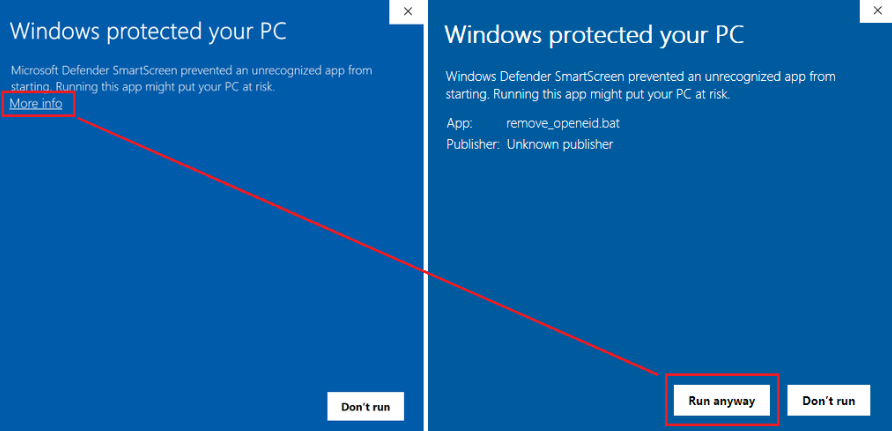
Windows Warning Screen
3

Get Reading

Once installed, launch Wordleach from your desktop and start speeding up your brain.

Publish your writing.

Send us your piece and details so we can get your writing the recognition it deserves in our library.

Send us a message